HTML Email Developer who ships Outlook-safe builds
I build production-ready email templates using table-based HTML, MSO conditionals, and VML fallbacks — with a QA-first workflow for reliable rendering across major email clients.
Based in India • International remote friendly • Portfolio projects with testing proof

QA-first workflow
Link checks, alt text, mobile stacking, Outlook fallbacks — plus screenshots for proof.
Portfolio Projects
Email Types Covered
Promo • Transactional • Newsletter
Compatibility Focus
MSO + VML fallbacks
Testing Proof
Litmus / Email on Acid screenshots
Featured Case Study
Klaviyo automation workflow case study: email capture landing page connected to a multi-step Klaviyo welcome flow, including trigger logic, segmentation setup, and QA validation.
Welcome Flow + QA Validation
A practical automation build demonstrating Klaviyo workflow setup, trigger configuration, segmentation logic, and a structured QA checklist ensuring every email renders correctly across clients.
- check_circle Klaviyo welcome flow trigger connected to email capture landing page
- check_circle Automated segmentation and conditional email logic
- check_circle QA validation including layout checks, links, images and fallback testing
Projects
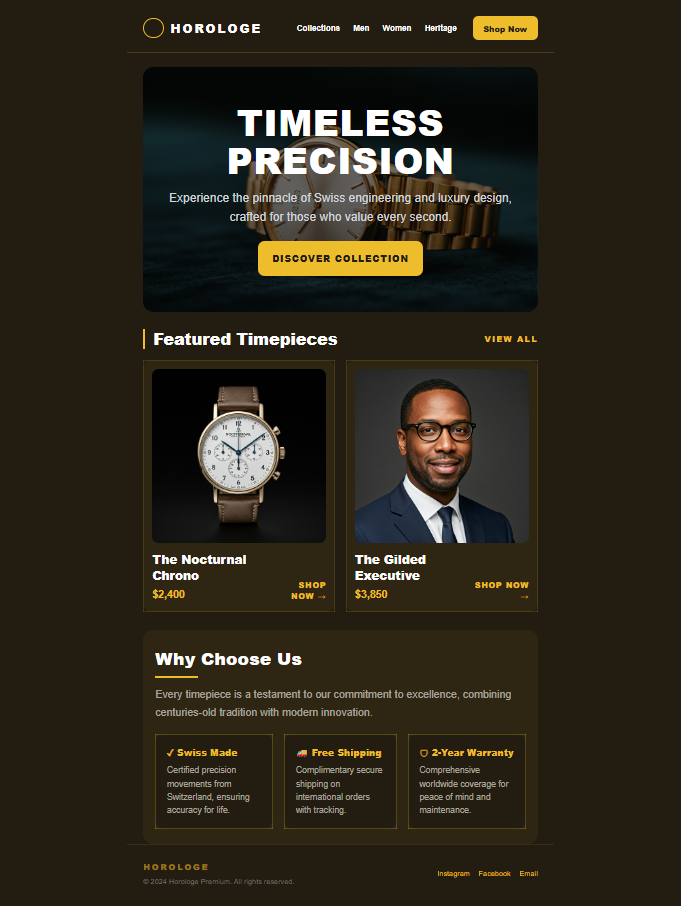
Promotional Email
Outlook-safeOne-column image-driven promo layout with robust spacing and predictable mobile stacking.
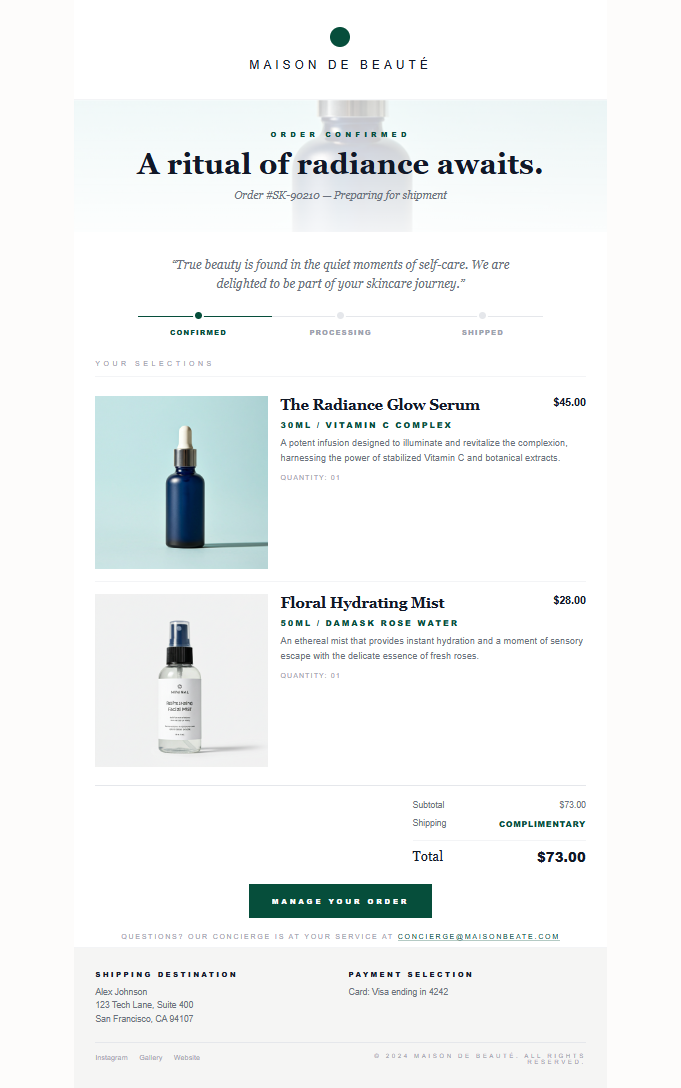
Transactional Email
Clean & fastReceipt / confirmation template designed for clarity, deliverability, and accessibility.
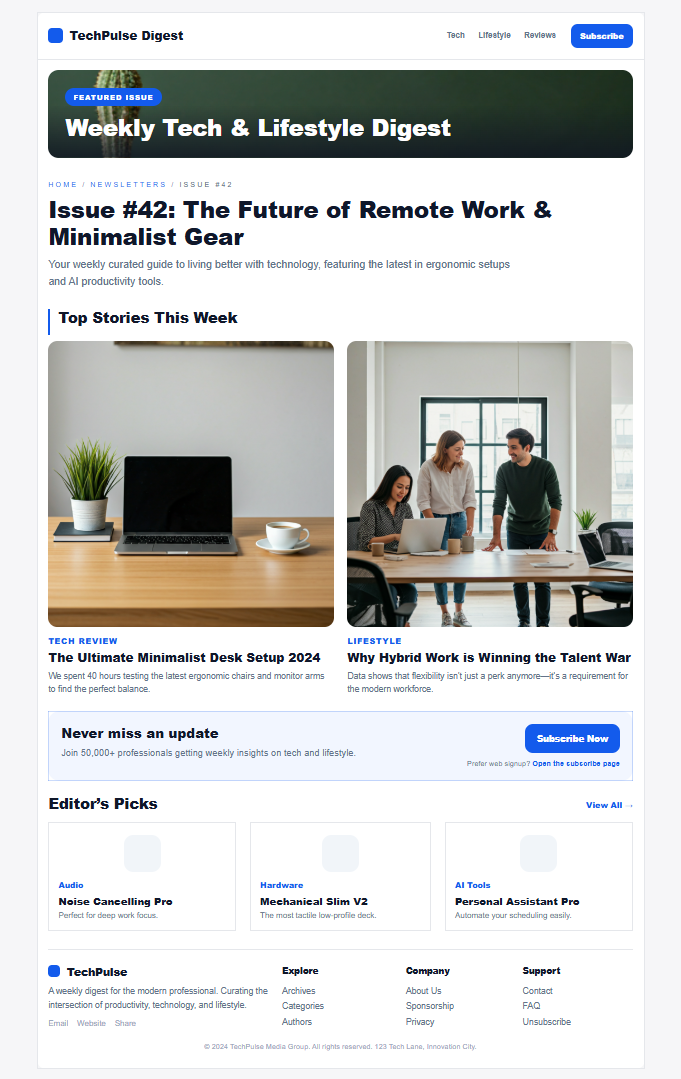
Newsletter Email
Content-heavyModular newsletter blocks for updates, blogs, and announcements — easy to reuse and maintain.
Development Process
A practical workflow that prioritizes compatibility, QA, and clean delivery.
1. Breakdown
Deconstruct layout into table modules & sections.
2. Build
Code table layout with inline styles and safe patterns.
3. Outlook Fallbacks
Add MSO conditionals + VML where needed.
4. Testing
Review key clients (Gmail, Outlook, Apple Mail, iOS).
5. Final QA
Links, images, alt text, spacing, and dark-mode checks.
Technical Approach
I build emails like a system: reliable table structure first, then Outlook fallbacks, then QA proof. Everything is designed to be maintainable, reusable, and safe across major email clients.
Architecture
- • 600px container + predictable padding
- • Table-based modules (hero, 2-col, grid, footer)
- • Inline CSS for client consistency
- • Safe font stacks + fallbacks
Goal: the layout survives Gmail, Outlook, iOS, and Yahoo without surprises.
Outlook Safety
- • MSO conditionals for Outlook-specific fixes
- • VML fallbacks for background images (when needed)
- • Bulletproof buttons for consistent CTAs
- • Spacing rules that hold in Word rendering
Goal: no broken heroes, no collapsed padding, no "Outlook surprises."
QA & Proof
- • Link audit + UTM-ready structure
- • Image loading + alt text checks
- • Mobile stacking + tap targets (44px+)
- • Dark mode awareness (safe contrast)
Proof: testi.at now, Litmus/Email on Acid screenshots as upgrades.
Code Pattern (Bulletproof CTA)
A safe CTA pattern I use across campaigns.
<!-- Bulletproof button (reliable across clients) -->
<table role="presentation" cellspacing="0" cellpadding="0" border="0">
  <tr>
    <td bgcolor="#895af6" style="border-radius:10px;">
      <a href="https://example.com"
         style="display:inline-block;padding:14px 22px;
                font-family:Arial, sans-serif;font-size:16px;
                line-height:16px;color:#ffffff;text-decoration:none;
                font-weight:bold;border-radius:10px;">
        Get Started
      </a>
    </td>
  </tr>
</table>
Skills
Focused on email engineering, QA, and practical automation foundations.
settings_ethernet Email Engineering
- Table-based layouts
- Inline CSS patterns
- MSO conditional comments
- VML backgrounds (when needed)
- Responsive stacking
hub ESP & Automation
- Klaviyo (flows + templates)
- Mailchimp basics
- ConvertKit basics
- Segmentation fundamentals
- Liquid placeholders (learning)
spellcheck QA & Delivery
- Litmus / Email on Acid workflow
- Link & image audits
- Alt text + semantics
- Dark mode awareness
- Basic deliverability hygiene
devices Frontend
- HTML + Tailwind
- Vanilla JavaScript
- Component-based structure
- Figma-to-code practice
- Basic performance hygiene
Compatibility Targets